


GA4 is a powerful and broadly accessible tool, allowing users to start collecting web analytics data, analyse that data and uncover valuable insights to fuel business decision making with minimal initial setup.
That said, an out-of-the-box GA4 configuration will leave much to be desired. While in-property setup guidance and support can help get a new GA4 property up and running, tailoring the in-property configuration settings to suit specific business needs, and to unlock GA4’s full potential, isn’t as straightforward.
A common pain-point amongst GA4 users and something we frequently uncover during GA4 audits, is a limited volume of data available prior to a specific period. That data is typically restricted to the last 2 months only with no in-property guidance from Google to explain why, severely limiting historical data analysis.
Let’s unpack why this happens, and how to retain your collected GA4 data for longer.
GA4 Data Retention
The reason for collected GA4 data only being shown for the last 2 months is GA4’s data retention settings. Buried within GA4’s admin interface, with no guidance to point you toward it during property setup, this setting controls how long both user-level and event-level data is retained for granular reporting purposes. Once collected data reaches the age specified within data retention settings, it is automatically deleted and no longer accessible.
By default, GA4’s data retention is set to 2 months for both user and event data. This means that individual event data (such as page views, scrolls and key events), event parameters, user identifiers like user-ID (if you set them) and user cohort data won’t be available before this period.
Unsure about your GA4 property configuration?
We tailor our Analytics services to suit your specific business needs, providing you with a GA4 property that you can rely on for decision making.
How to Adjust GA4’s Data Retention Period Settings
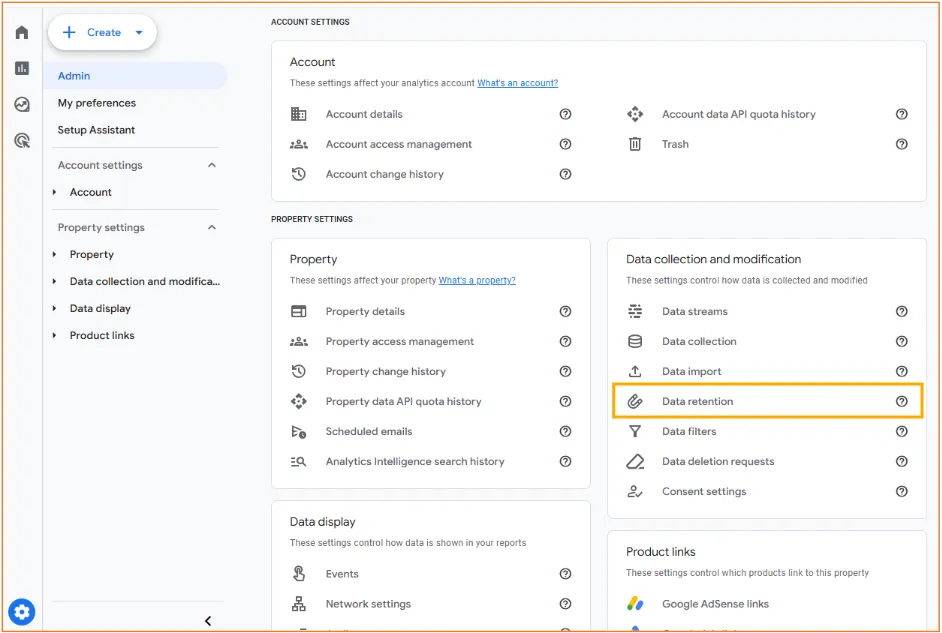
To adjust GA4’s data retention settings, navigate to GA4’s Admin, then under Data collection and modification, select Data retention.
Note that your Google account will need Editor permissions or above to adjust this setting.
In almost every case we recommend configuring data retention for both event and user data to as long as your GA4 property allows. There is no tangible cost or drawback associated with increasing the data retention period.
For free (standard) GA4 properties, this is 14 months for both settings.
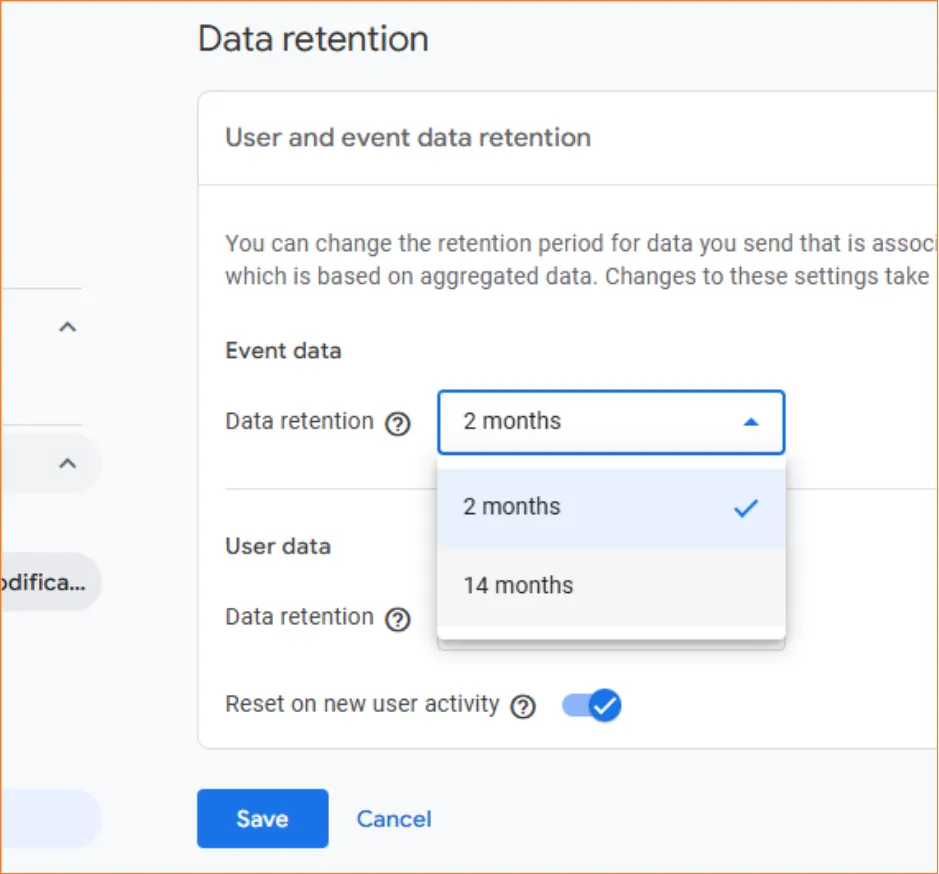
We recommend leaving the “Reset on new user activity” toggle below the retention period selection enabled. Specific to user data, this means that upon a user revisiting your website following an initial visit, the data retention period will be reset at the beginning of each subsequent visit. This retains your user data for the longest period possible.
Disabling this feature will automatically delete user data at the expiration of the data retention period, irrespective of any additional user activity.
Data Retention in Analytics 360
For those that benefit from a paid Analytics 360 property, GA4’s data retention options are expanded.
User data is still retained for a maximum of 14 months just like a standard property, though event data can be retained for an extended 26, 38 or 50 months. This allows 360 users to analyse granular, non-aggregated event data across extended periods directly in-property.
Exclusions and Limitations
Note that regardless of this setting, you’ll still be able to see data within GA4’s aggregated (standard) reports for as long as it has been collected, as Google stores aggregated data separately. The main drawback of restricted data retention is limited data with GA4’s Explorations.
Other notable exclusions from this setting apply, including:
- Conversion (key event) counts in aggregated reports
- Conversion (key event) counts for actions imported into Google Ads
- Attribution data, such session source/medium data in aggregated reports
- Audience memberships, though bear in mind that membership qualification windows still apply
Several limitations also apply for specific data types. Google-signals data, signed-in Google account data used to support remarketing and cross-device measurement, is limited to a maximum of 26 months for all GA4 properties. Age, gender and interest data is also limited to 2 months irrespective of settings, therefore automatically deleted beyond this period.
Limitations are also applied to properties that collect extreme volumes of event data, Large or XL properties. If a property is deemed as Large or XL by Google, data retention is limited to 2 months irrespective of settings.
Need expert support with GA4?
At MRS, we offer Google Analytics auditing services to unpack your GA4 property, identify its configuration strengths and weaknesses, and inform you of the adjustments needed to improve your data collection, data integrity and reporting.
Get in touch to find out more.